
 accsly editorial

- If your players are in Russia, put the server in Moscow or St Petersburg. Ping between the two cities is about 8 ms, while Moscow to Frankfurt or Amsterdam is already about 49 ms.
- Ten players are fine on 2 fast cores and 4 GB of RAM. For 20–32 slots take 4 cores and 8 GB. Either way you need a disk of 80 GB or more, because the game alone takes about 60 GB. A Minecraft server is sized differently, by players and plugins, see our Minecraft guide.
- A suitable plan costs from $12.85 to about $25 a month, which is roughly $154 to $300 a year. Plans under $11 with the same cores usually come with a disk that is too small.
In Russia you can find 2-core, 4 GB plans for $5–9 a month, but three out of four of them come with a disk under 65 GB. Valve states plainly that the server download is about 60 GB and asks for 65 GB of storage. The game only grows with updates, so on a 40 or 60 GB disk it simply won't install. That is why the list above only shows servers with 80 GB or more.
Why Russia and not Western Europe? In a shooter every extra millisecond shows. A signal in optical fibre travels at about 5 microseconds per kilometre, so even a perfectly straight line from Moscow to Frankfurt gives 20 ms there and back. Real routes wind about, and the ping ends up two and a half times higher. On a Moscow server your players will die "behind the wall" far less often.
How many players do you have?
The load sits almost entirely on one core. The main game loop, where the server works out shots and movement, runs in a single thread, which is why game hosting companies all tell you to look at clock speed rather than core count. Memory grows more slowly. An empty server with a map loaded takes 2–3 GB, and each player adds roughly 100 MB. The game mode usually tells you how many slots you need. In the game's own mode file, gamemodes.txt, Competitive has 10 slots, Wingman 4, Deathmatch and Arms Race 16 each, and Casual 20.
Your own 5v5
This is a server for team practice, scrims and evening matches with friends behind a password. Ten people play Competitive.
- 2 cores at 3 GHz+
- 4 GB RAM
- NVMe 80 GB+
- IPv4
Valve's official minimum is modest, just 2 GB of RAM. But with a Workshop map, a couple of plugins and ten players the server creeps up to 3–4 GB, and the operating system needs memory too. So 4 GB is the right size here. The second core isn't for the game itself but for everything else: SSH, updates and demo recording, so they don't steal time from the main thread.
If you play once a week, think about hourly billing. You can create the server before a session and delete it afterwards. Just keep in mind that every time you will download 60 GB again, which takes 10 to 30 minutes.
A public 20-slot server
This covers Casual 10v10, Deathmatch, retakes and warm-up with bots. A server like this is usually in the public list.
- 4 cores at 3 GHz+
- 8 GB RAM
- NVMe 80 GB+
- IPv4
Game hosting companies recommend 6–8 GB of RAM for 10–20 players and 4 CPU threads for a public server. For comparison, Rust, Palworld and ARK need 12–16 GB — why, and how not to overpay, is in Rust, Palworld or ARK server on a VPS.
Look at the price. The cheapest honest 8 GB plan costs $13.01, almost the same as the cheapest suitable 4 GB plan at $12.85. So even for 5v5 I would check the 8 GB plans first: the difference may be a few cents a month.
A 32-player community
This is a permanent server for your community: surf, jailbreak and plugin-based modes.
- 4 cores at 3.5 GHz+
- 8–12 GB RAM
- NVMe 100 GB+
- DDoS protection
Each extra player means more shots and movement to process within the same tick, and all of it runs on one core. So here I would raise the bar to 3.5 GHz, or better still pick a plan from the 4 GHz and up selection. Memory for 20–32 players is estimated at 8–12 GB, and five or more plugins eat about another 2 GB on top.
Public CS2 servers are often hit with floods of junk packets on the game port. You need DDoS protection, and specifically one that filters UDP. Many protection services are built for websites only and do nothing for game traffic.
Data table
| Server | Plans | Minimum | One in four under | Median | Year, min–median |
|---|---|---|---|---|---|
| 5v5, 2 cores, 4–6 GB | 11 | $12.85 | $17.43 | $25.22 | $154–303 |
| 20 slots, 4 cores, 8 GB | 22 | $13.01 | $26.49 | $39.42 | $156–473 |
| 32 players, 4 cores at 3.5 GHz+, DDoS | 23 | $17.02 | $26.49 | $36.61 | $204–439 |
I would pick from the dark part of each bar. For 5v5 that means up to $17.43 a month, for a public server or a community up to $26.49. Beyond that you pay for disks of several hundred gigabytes, a well-known brand or cores you don't share with anyone. How prices change for servers with other amounts of memory is shown in VPS prices in 2026.
Why clock speed beats core count
A CS2 server runs at 64 ticks, and you can't switch it to 128 the way you could in CS:GO. Even FACEIT plays on 64. Shooting accuracy relies on the sub-tick system, which records the exact moment of a shot between ticks. The server, however, works to a strict schedule. Every 15.6 ms it has to collect every player's input, simulate the world and send the result back. If it falls behind, players see a stutter.
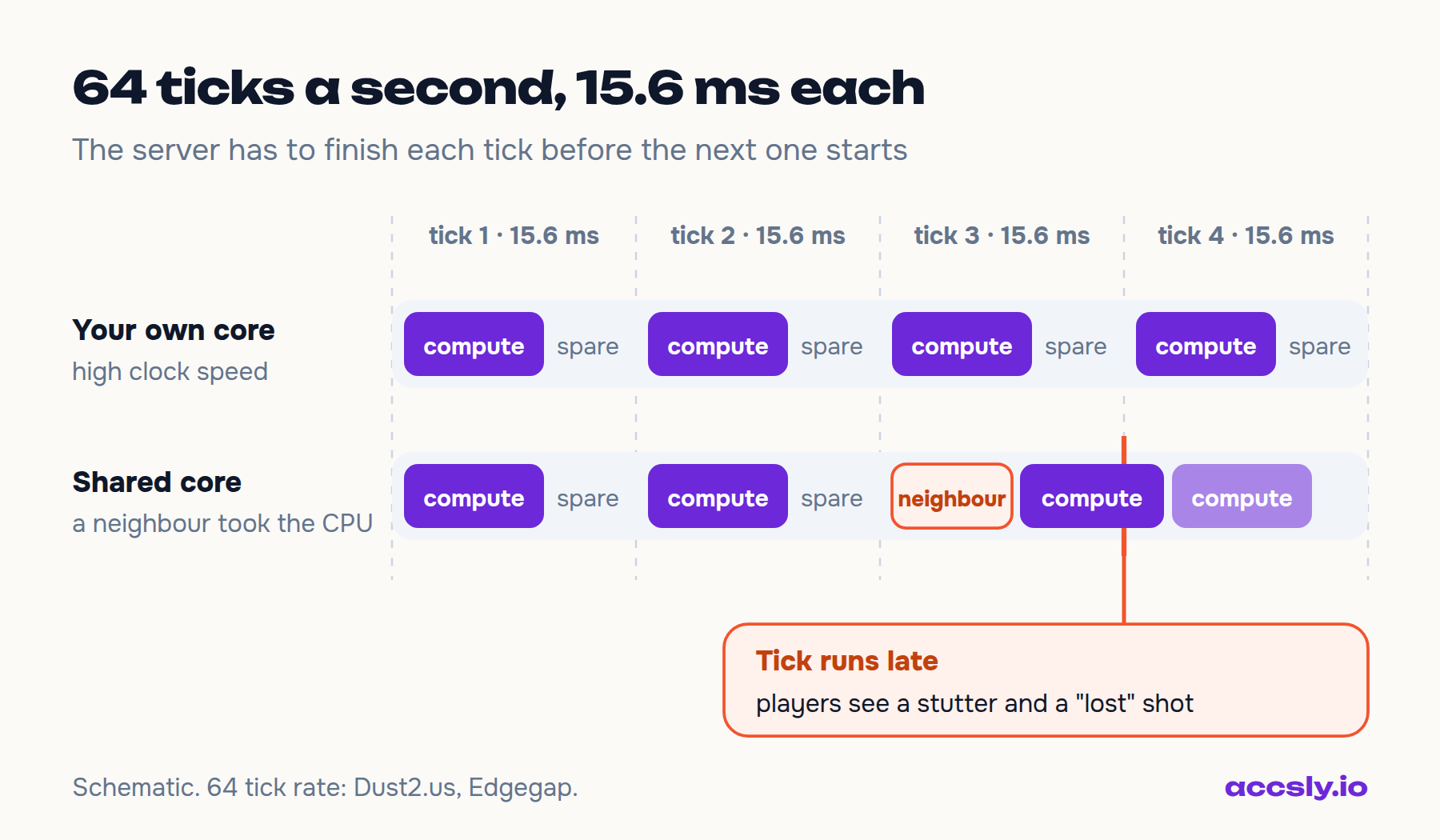
Eight slow cores won't help, because the main thread still runs on one. What helps is a high clock speed and a core that is really yours. On cheap plans the core is shared with neighbours: on average everything looks fine, but when a neighbour loads the CPU, your tick runs late right in the middle of a firefight. You can check this after buying. Run top in the evening and look at the st value in the %Cpu line, which is the time your neighbours took from you. If it regularly sits above a few percent, ask the hosting company to move you to another machine or change plans.
The load graph in the hosting panel tells you nothing during the day: with no players the server goes to sleep, controlled by the sv_hibernate_when_empty setting. Check it during the hours when everyone plays.
Moscow, St Petersburg or Europe?
For players in Russia, Moscow almost always wins. The main backbone routes converge there, and even from Novosibirsk the ping to Moscow is about 44 ms, lower than Moscow to Frankfurt. If the whole group lives in St Petersburg, choose a server in St Petersburg. The two cities are only about 8 ms apart, so players in Moscow will barely notice.
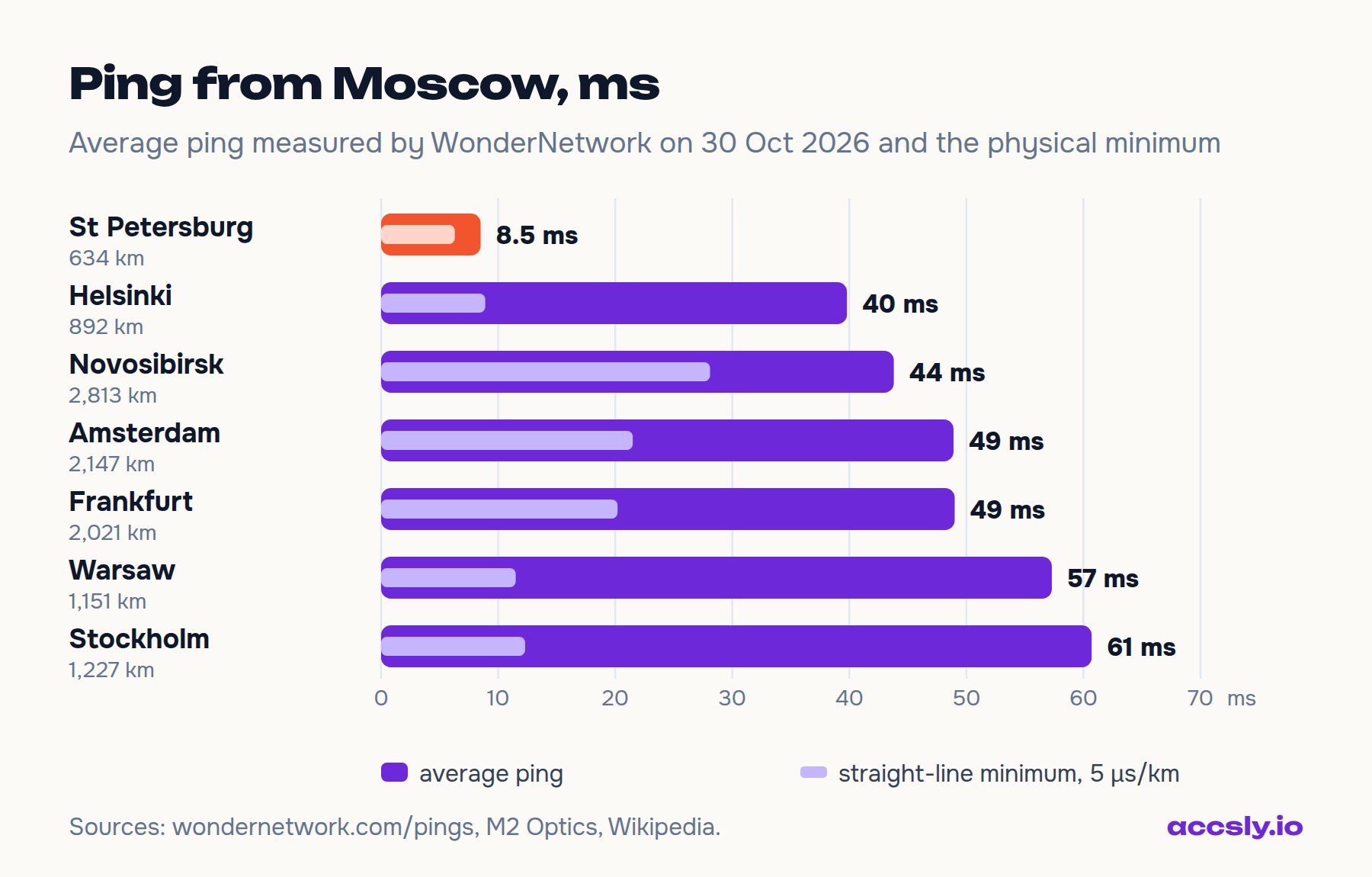
Europe makes sense when some or all of your players live there. A server in Frankfurt gives Moscow players about 49 ms. That is still playable, but in AWP duels you already feel the difference. If your whole group is in Western Europe, the logic flips and Frankfurt or Amsterdam is the obvious choice.
Check the hosting company's network yourself before you pay. Most of them publish a test IP address. Ping it with ping or mtr for five minutes in the evening, when networks are busiest. Look not only at the average but also at the spread and packet loss. Jumps from 10 to 60 ms are more noticeable in a game than a steady 30.
Five catches that cost you money
If a plan fits on cores and memory, check it against five more points. Each one comes with a sign that lets you spot the catch right on the hosting company's page.
- A disk under 65 GB
This is the most common mistake. In Russia three quarters of plans with two cores and 4 GB of RAM come with a 20–60 GB disk. A plan at $5.36 looks great until you notice its 30 GB disk and a game that weighs 60.
Sign: check the disk size before the price. Don't go below 80 GB, because updates and demos eat space quickly. - A hard drive instead of SSD
A plan with 4 GB of RAM and a 150 GB disk for $8.32 is tempting, but the disk is slow network storage. Maps will take ages to load, and a multi-gigabyte update will stretch to an hour.
Sign: the plan name says "HDD", "ceph" or "big disk", and there's nothing about NVMe or SSD. - No CPU clock speed listed
If the hosting company names neither the CPU model nor its clock speed, it is often an old low-clocked processor. A core like that may not fit into 15.6 ms per tick when the server is full.
Sign: the page has no "GHz" and no model such as Ryzen, EPYC or Xeon Gold. Ask support before you pay. - No IP address of your own
Plans marked NAT share one address among dozens of customers. Players connect by address and port, and on a shared address you get a random port like 41237. Not every hosting company forwards UDP either.
Sign: the name contains "NAT", and the description says "shared IPv4" or "20 ports". - DDoS protection for websites only
The word "protection" in a plan means nothing yet. Many filters only understand web traffic and let a flood on UDP port 27015 straight through, and the server drops in the middle of a map.
Sign: the description says "L7 protection" or "website protection" and says nothing about UDP or game servers. Ask support directly: "do you filter UDP floods on a game port?"
See how these catches look on live plans. Below are the cheapest servers in Russia with two 3 GHz cores and 4 GB of RAM, with no disk filter. Look at the disk size in each row: most have 30–60 GB, and a big disk at this price usually turns out to be a hard drive. An orange label, if a row has one, points to another catch.
Planning a GTA 5 roleplay server on FiveM? How much memory and CPU it takes and what the launch costs is covered in A GTA 5 RP server after RAGE MP shut down: which VPS FiveM needs.
How to get a CS2 server running in half an hour
I'll show the setup on Ubuntu 24.04, following Valve's instructions and the Hetzner tutorial. Run them as root unless a step says otherwise.
- Order the server
Pick Ubuntu 24.04, a city close to your players and a disk of 80 GB or more.
- Create a separate user
The server will run without admin rights. If a plugin turns out to have a hole, an attacker only gets the game folder, not the whole machine. The same approach is described in the article on a server for a Telegram bot.
apt update && apt -y upgrade adduser --disabled-password --gecos "" cs2 - Install SteamCMD
SteamCMD downloads the game from Valve's servers. It needs the multiverse repository and 32-bit libraries. The installer will ask you to accept the Steam licence; say yes.
add-apt-repository -y multiverse dpkg --add-architecture i386 apt update && apt install -y lib32gcc-s1 steamcmd - Download the game
The server installs as the game itself, app ID 730, logged in without a Steam account. Wait for
Success! App '730' fully installed. The last line matters: without it the server can't find the Steam library and won't start.su - cs2 /usr/games/steamcmd +force_install_dir ~/cs2 +login anonymous +app_update 730 validate +quit mkdir -p ~/.steam/sdk64 ln -s ~/.local/share/Steam/steamcmd/linux64/steamclient.so ~/.steam/sdk64/ - Get a GSLT token
Without a token only players on your local network can connect. Create one on the game server management page using app ID 730. The account must own the game, have a phone number attached and not be limited. The $5 limit is explained in detail in the article on checking a Steam account. Each server needs its own token.
exit nano /etc/cs2.env # one line: GSLT=YOUR_TOKEN chmod 600 /etc/cs2.env - Open the ports
The game needs UDP 27015, the RCON remote console needs TCP 27015, and CSTV match broadcasting needs UDP 27020. Ports 27005, 27036 and 4380 from some guides are for the game client, not the server.
ufw allow 22/tcp
ufw allow 27015/udp
ufw allow 27015/tcp        # only if you need RCON
ufw allow 27020/udp        # only if you enable CSTV
ufw enable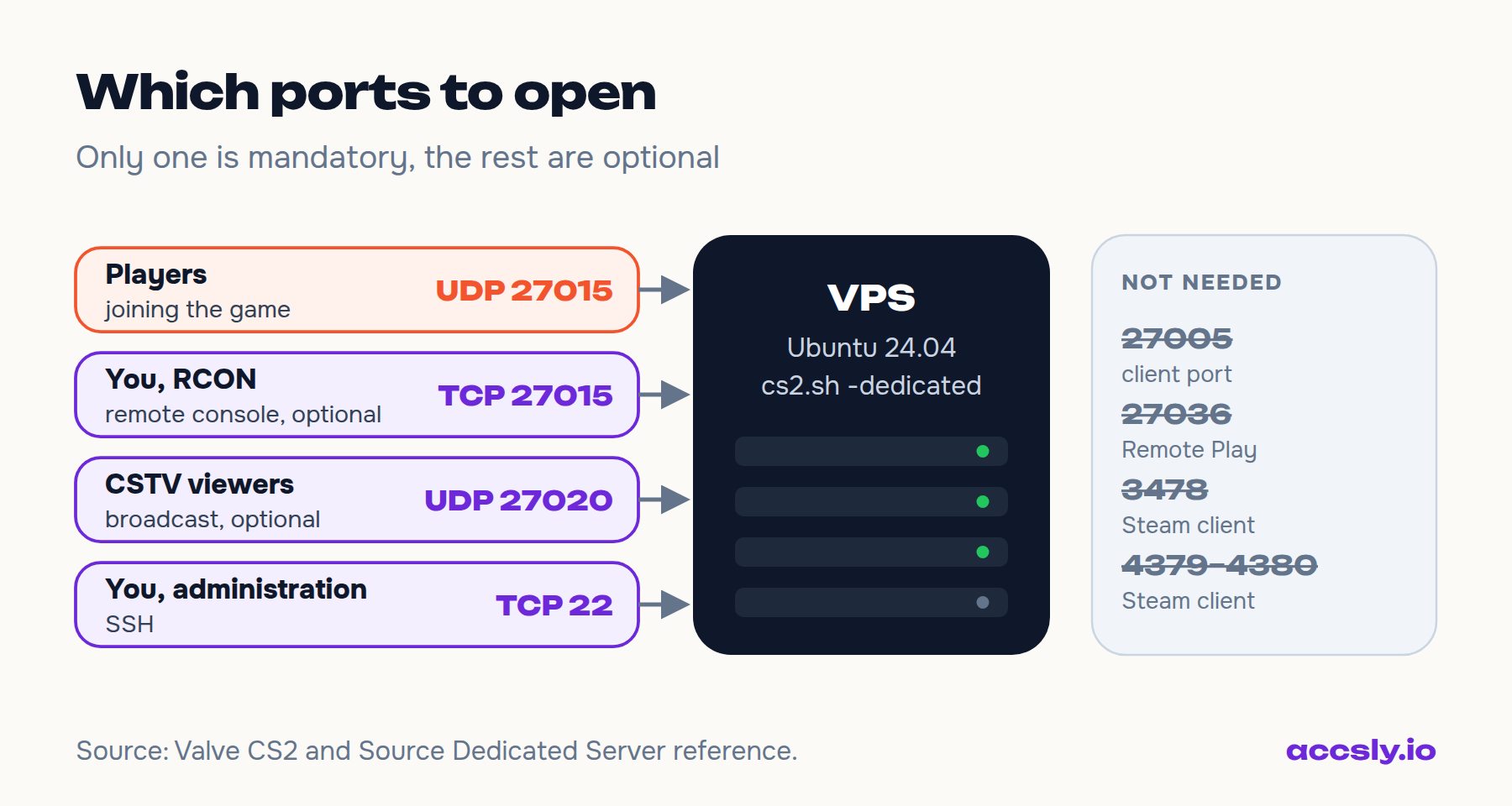
Only UDP 27015 is mandatory. The other ports are needed if you manage the server over RCON or broadcast matches. Port numbers come from the CS2 variable list and Valve's dedicated server reference. - Make the server a service
A systemd service restarts the server after a crash and brings it back after a reboot. The options
+game_type 0 +game_mode 1select Competitive. For 20-slot Casual set+game_mode 0and-maxplayers 20. Create the file/etc/systemd/system/cs2.service.[Unit] After=network-online.target Wants=network-online.target [Service] User=cs2 WorkingDirectory=/home/cs2/cs2/game EnvironmentFile=/etc/cs2.env ExecStart=/home/cs2/cs2/game/cs2.sh -dedicated -port 27015 -maxplayers 10 +game_type 0 +game_mode 1 +map de_dust2 +sv_setsteamaccount ${GSLT} Restart=always RestartSec=5 [Install] WantedBy=multi-user.target - Start it and connect
Once the log shows the map loading, open the in-game console and type
connect SERVER_IP:27015. A password for friends goes into thesv_passwordline ofgame/csgo/cfg/server.cfg.systemctl daemon-reload systemctl enable --now cs2 journalctl -u cs2 -f
Updates and plugins. After every Valve patch, stop the server, run the step 4 command again and start it back up. If you use Metamod, the patch overwrites gameinfo.gi, and you have to add back the line Game csgo/addons/metamod by hand, or all plugins will silently stop loading.
Don't give players skins they don't own. Valve's server guidelines forbid it outright. For a violation Valve permanently bans the account from running community servers and gives it a matchmaking and trading cooldown. A menu with stock weapons, custom scores and names on the scoreboard are allowed.
Prices come from hosting companies' websites, converted at the Central Bank of Russia rate. The live plan blocks refresh every hour, so their figures may differ slightly from the text. Minimums and medians were calculated from the accsly.io catalogue on 30 October 2026, and ping comes from WonderNetwork measurements on the same day. All plans with 3 GHz+ cores are collected on the VPS for CS2 page.